Deployment Stats
2
Active Rules
1
Live Incidents
5min
Detection Cadence
KQL
Query Language
Pipeline Architecture
DATA SOURCE
Azure Security Events & Diagnostics Logs
→
WORKSPACE
Log Analytics (cyberangel-loganalytics)
→
DETECTION
Custom KQL Rules (Scheduled, every 5 min)
→
INCIDENT
Sentinel Incident Queue → Triage → Response
Build Walkthrough
STEP 01
Custom Detection Rules — Analytics Dashboard
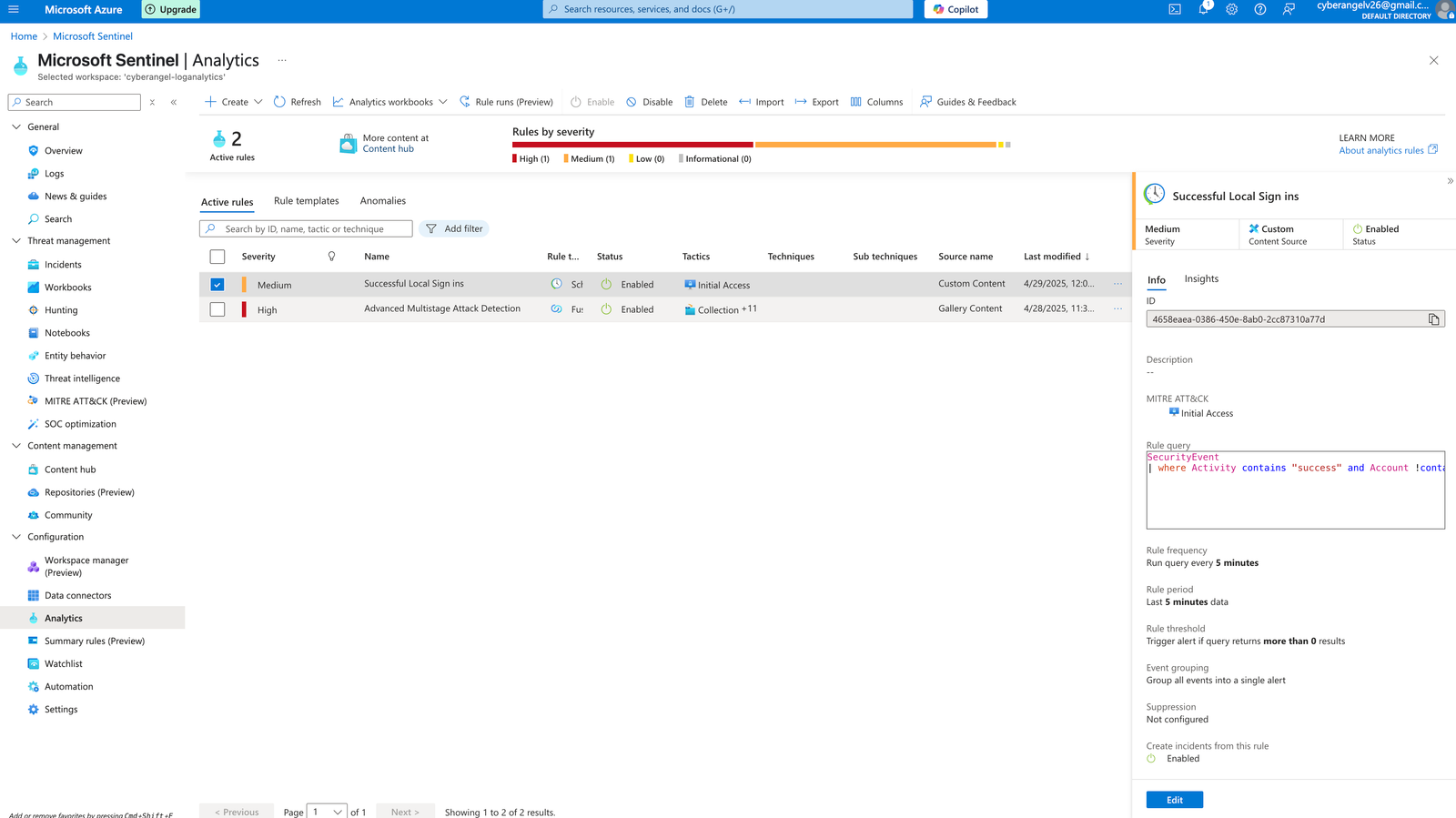
What you're seeing
Two active detection rules running in a live Sentinel workspace — one custom-built (Medium severity), one from the Microsoft gallery (High severity for Multistage Attack Detection).
Why it matters
The custom "Successful Local Sign ins" rule was written from scratch using KQL — not imported from a template. It's mapped to the MITRE ATT&CK Initial Access tactic and runs on a 5-minute detection cycle.
STEP 02
Access Control — Azure IAM Role Configuration
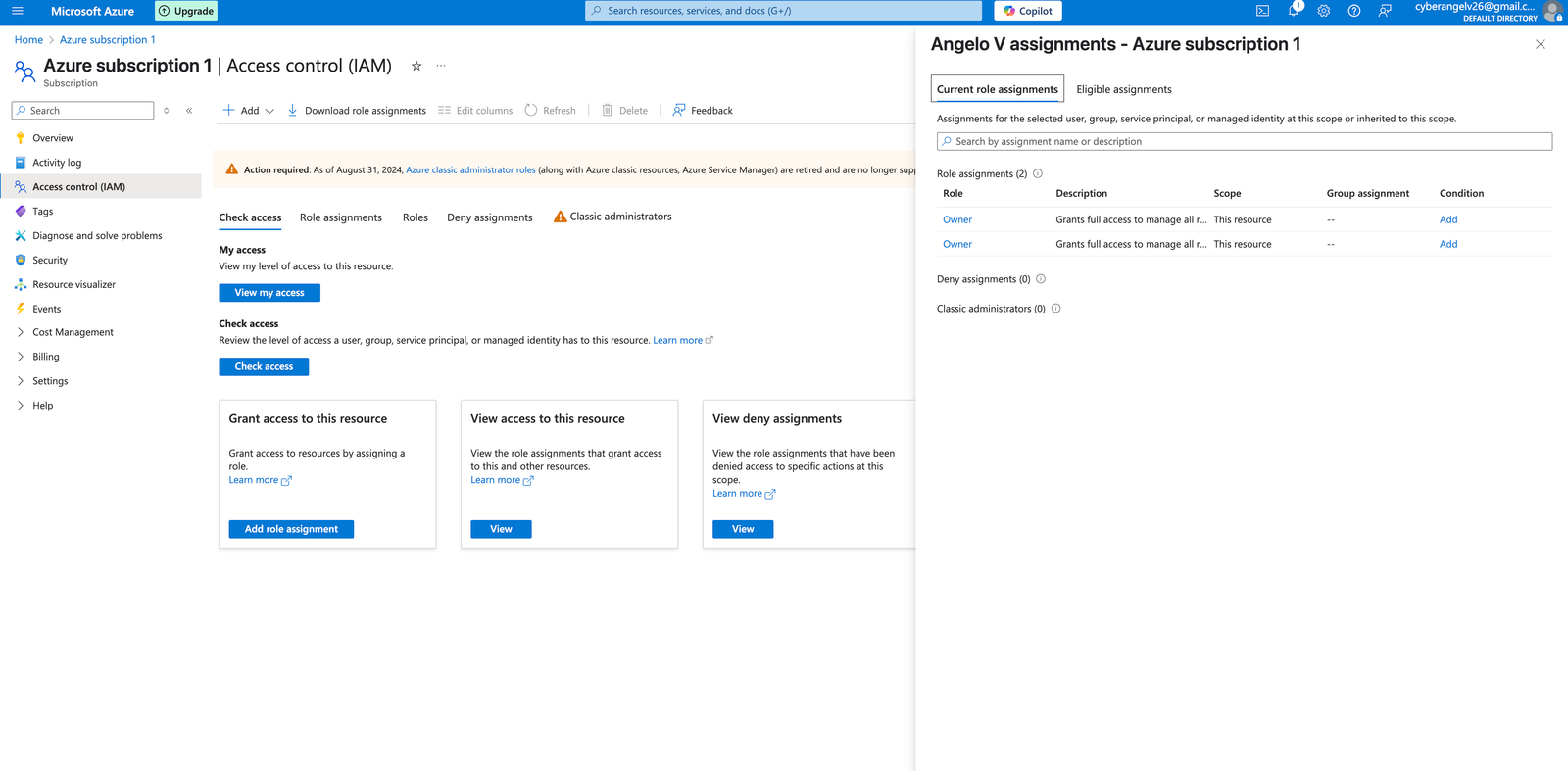
What you're seeing
Azure Identity and Access Management (IAM) configured with Owner-level role assignments at the subscription scope — controlling who can read, write, and manage resources across the entire environment.
JSOC relevance
Access control administration is a core JSOC function. Understanding how role assignments are structured in enterprise identity systems is directly applicable to access auditing and insider risk detection.
STEP 03
Detection Engineering — Writing the KQL Rule
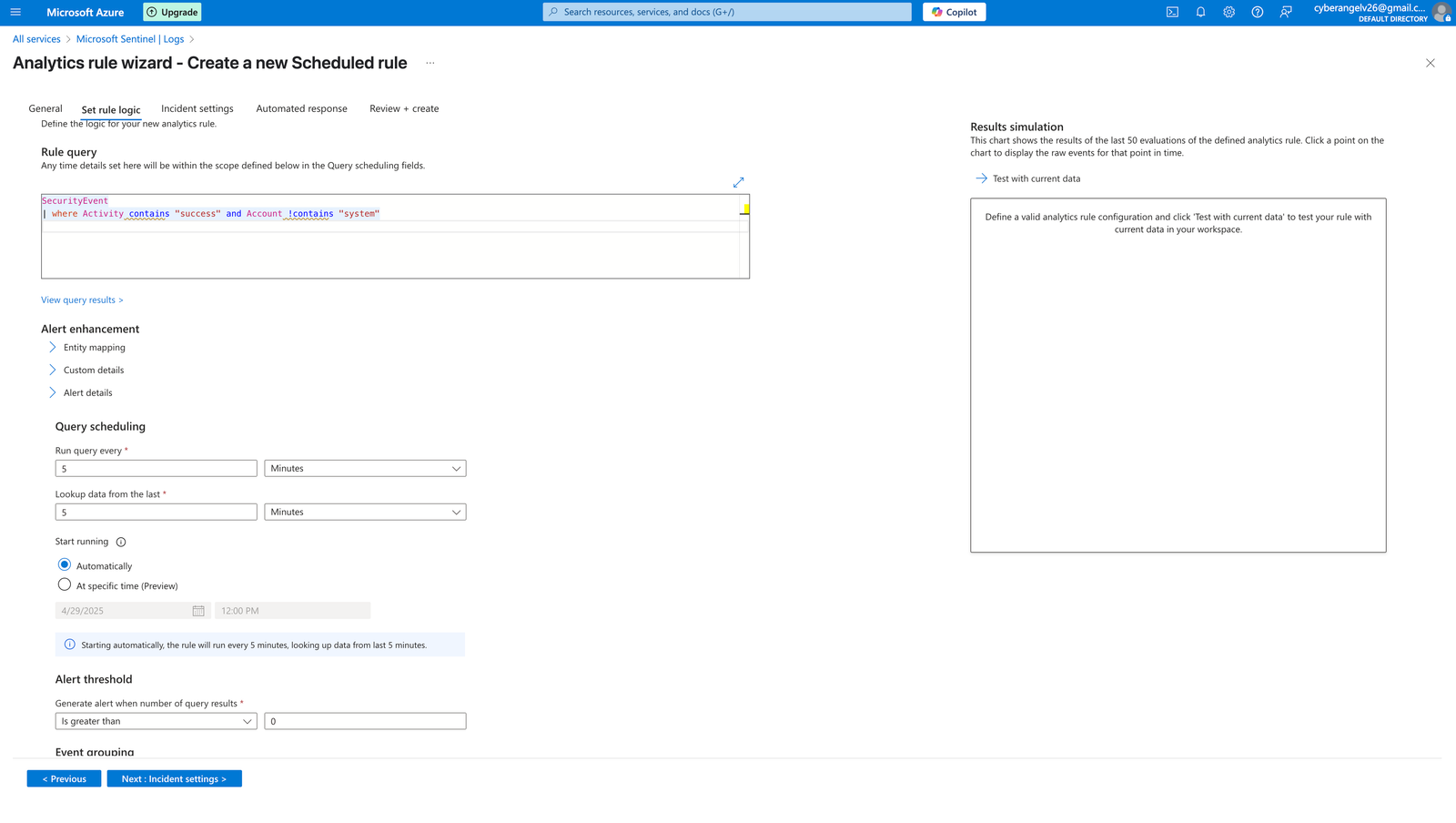
Rule logic
Custom KQL query targeting SecurityEvent logs — filtering for successful logins while excluding known system accounts. Runs every 5 minutes against the last 5 minutes of data. Fires when any result is returned.
Detection design intent
Designed to catch unauthorized or unexpected successful local logins — a key indicator of Initial Access (MITRE T1078: Valid Accounts) or lateral movement by an attacker using compromised credentials.
KQL // DETECTION RULE
Successful Local Sign-ins — Custom Rule
// Detect successful local sign-in events
// Excludes system accounts to reduce noise
// Mapped to: MITRE ATT&CK — Initial Access (T1078)

SecurityEvent
| where Activity contains "success"
| where Account !contains "system"
TACTIC: Initial Access
T1078 — Valid Accounts
T1110 — Brute Force
T1021 — Remote Services
STEP 04
Live Incident — Rule Triggers, Incident Generated
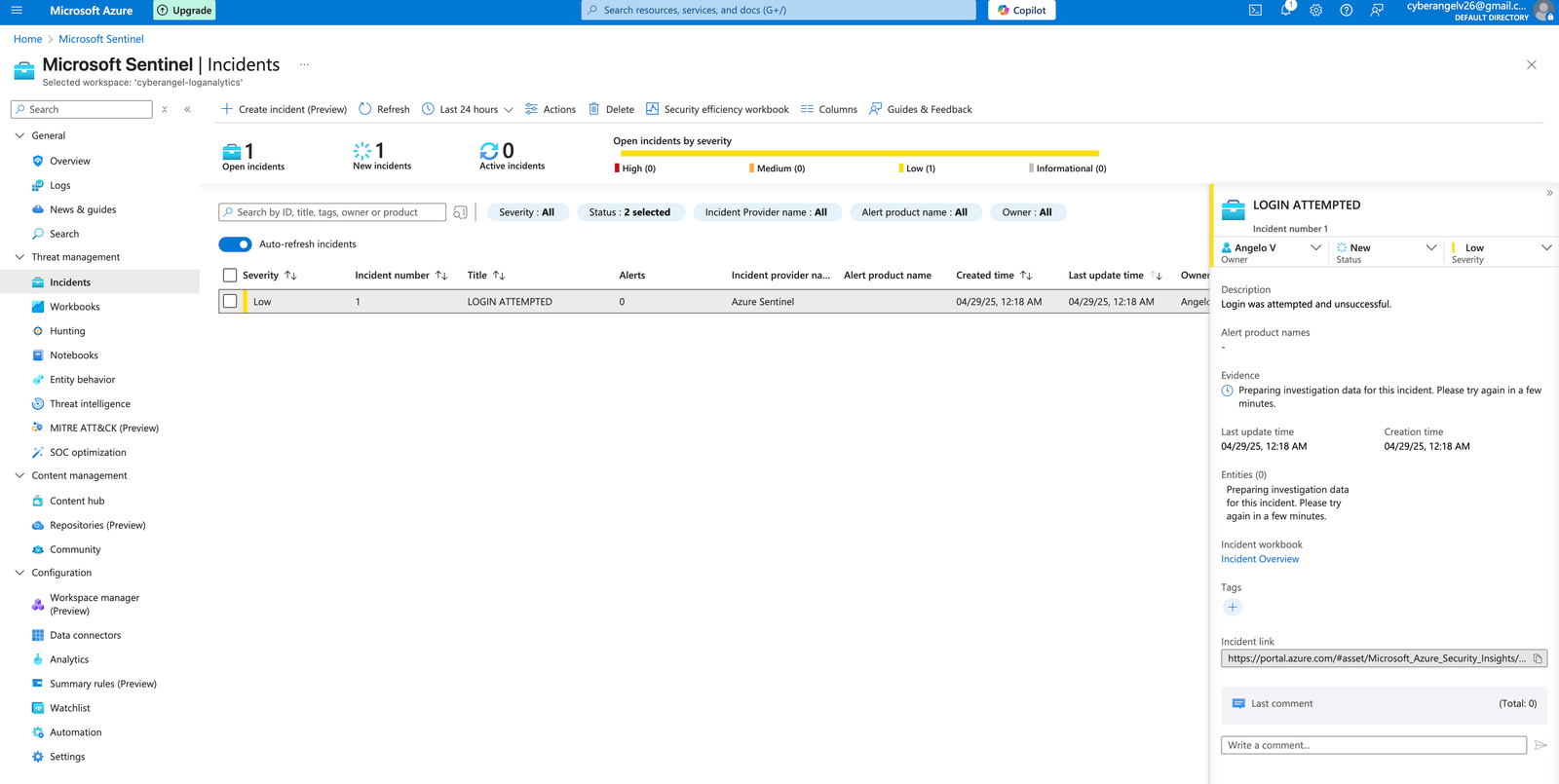
What happened
The custom detection rule triggered and automatically created Incident #1: "LOGIN ATTEMPTED" — severity Low, status New, assigned to Angelo V, timestamped 04/29/25 at 12:18 AM. This is a real alert from a real detection rule on a live workspace.
Triage process
Incident was reviewed for entity context, timeline, and evidence. Description confirmed: "Login was attempted and unsuccessful." Classified, documented, and queued for response — completing the full SOC analyst workflow.
STEP 05
Threat Hunting — KQL Log Queries in Sentinel
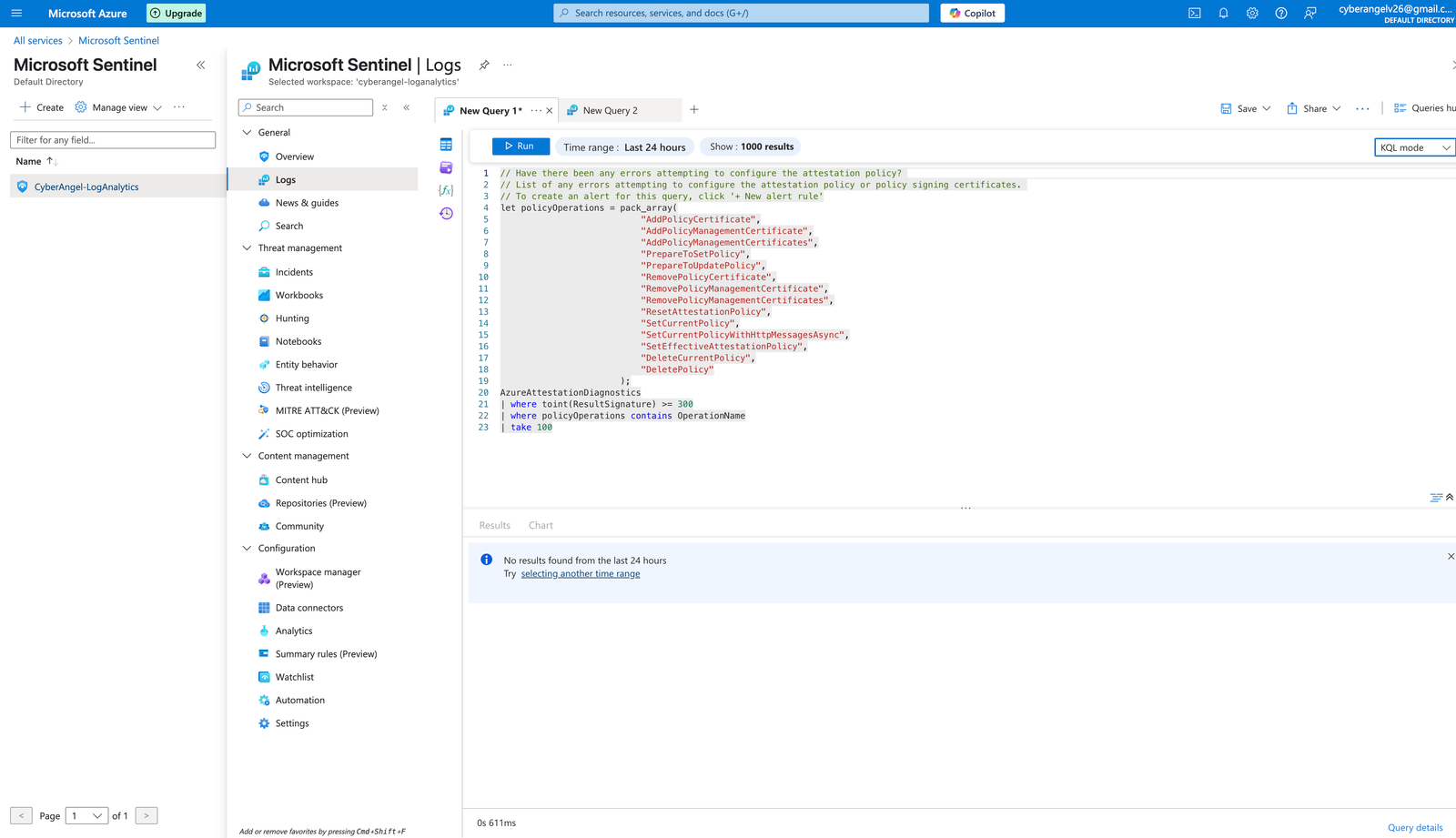
KQL // THREAT HUNT
Attestation Policy Error Detection
// Hunt for errors in attestation policy configuration
// Flags sensitive policy operations with slow response times

let policyOperations = pack_array(
    "AddPolicyCertificate", "AddPolicyManagementCertificate",
    "PrepareToSetPolicy", "SetCurrentPolicy",
    "RemovePolicyManagementCertificate", "DeletePolicy"
);
AzureAttestationDiagnostics
| where toint(ResultSignature) >= 300
| where policyOperations contains OperationName
| take 100
Threat hunt objective
Proactively querying Azure Attestation Diagnostics for policy configuration errors with HTTP status codes ≥ 300 — hunting for misconfigurations or unauthorized policy changes before they become incidents.
Analyst skill demonstrated
Writing multi-step KQL with variable declarations, array operations, and compound filtering. This goes beyond basic queries — it reflects understanding of how log tables are structured in Azure's security data model.
End-to-End SOC Workflow
01 // PROVISION
Azure Sentinel Workspace Setup
Created and configured a Log Analytics workspace (cyberangel-loganalytics) as the Sentinel data plane. Configured IAM with Owner-level role assignments and connected data connectors for security event ingestion.
02 // ENGINEER
Custom Detection Rule Authoring
Wrote a scheduled KQL analytics rule from scratch targeting SecurityEvent logs. Configured 5-minute detection cadence, alert threshold logic, entity mapping, and MITRE ATT&CK tactic tagging (Initial Access).
03 // DETECT
Live Alert Generation
Rule executed against live log data and triggered a real incident — "LOGIN ATTEMPTED" (Incident #1) — automatically classified by severity, timestamped, and pushed into the incident queue for triage.
04 // TRIAGE
Incident Investigation and Documentation
Reviewed incident context, evidence, entity data, and timeline within Sentinel's investigation workbook. Classified severity, documented findings, and completed the structured response workflow.
05 // HUNT
Proactive Threat Hunting via KQL
Beyond reactive detection, wrote proactive log queries hunting for attestation policy anomalies, authentication failures, and configuration drift — demonstrating threat hunting behavior beyond basic rule monitoring.
JSOC Relevance
The skills demonstrated in this build translate directly to the tools and workflows used by the JSOC and Synchrony's broader security operations environment. Detection engineering, log analysis, incident triage, and structured escalation are the daily operating rhythm of a Physical Security Intelligence Analyst.
Incident Triage
Managing a live incident queue, classifying severity, reviewing evidence, and documenting findings mirrors the JSOC's ServiceNow-based security event logging and escalation workflow.
Detection Engineering
Writing custom detection logic in KQL demonstrates the same analytical mindset used to build and refine threat detection rules against physical access, fraud, and behavioral data.
Access Control Auditing
Configuring and reviewing IAM role assignments in Azure directly parallels JSOC responsibilities around access control auditing, cardholder access reviews, and identity-based anomaly detection.
Threat Hunting
Proactively querying logs to find anomalies before they escalate reflects the intelligence-led approach the JSOC uses across fraud detection, OSINT, and physical security threat assessment.